
Regex stands for Regular Expression, which is a technique used by SEO professionals to target high search queries and keyword research with precision.
With manual keyword targeting, you miss the queries after hours of research. The problem is not in strategy; it is choosing the right keywords.
In regex, you filter out specific words and exclude unwanted terms by typing an expression. As an SEO Executive, becoming more proficient with Regex helps rank higher in organic search results.
For sharper targeting, cleaner data, and keywords that match search intent, Regex is a must-have technique.
In this article, we will look in detail at how regex works to find targeted keywords and the standard regex practices SEOs use to design content strategies.
Table Of Contents
What is Regex?
A regex is an expression used in searching data to show data according to a particular condition. In regex, you define a complex search pattern in text to match words beyond finding exact words.
To form those patterns, regex uses a combination of special characters (symbols, punctuations, brackets) and literal characters (‘a, ‘\b’)
For example, an expression typed in the Google Search Console filter like “ .*Ball. ” shows match any keyword or string that contains the word “Ball”, whereas “ . ” means any single character and “ * ” means zero or more repetitions of the preceding character.
With these expressions, you can figure out informational, transactional, and commercial intent queries. With regex, you may also find question-based and number-based keywords to include in the blog.
Why does Regex matter in Google Search Console?
Google Search Console (GSC) describes how well your website performs in Google SERP. It allows analysis to create an informed strategy using targeted keywords.
For advanced filtering of website data, GSC adds custom regex functionality to the performance report. These are the following benefits of regex in Google Search Console
Advanced Filter
A basic filter allows an exact match or excludes a feature of a particular word, whereas a regex filter lets users create a filter based on their requirements.
Regex enables analysing patterns and segmenting data that would be impossible with a basic filter.
Focused Data
With regex, you can isolate URLs and search queries to choose from a detailed, broad dataset. It increases the SEO expert’s focus on valuable user interactions.
Identify Issues
Regex creates targeted filters to search for specific issues affecting your website’s performance in search results.
Intent-Based Search
Regex helps in grouping similar queries. You can group keywords by intent, like informational and transactional, to understand what users want. SEOs work on these keywords to align the content strategy and improve its effectiveness.
How to use Regex in Google Search Console?
The regex filter is very easy to use in Google Search Console. Follow these steps to find a keyword
- Open Google Search Console
- Go to the performance tracking menu from the left side of the bar
- Click on Add filter menu tab
- Select the custom regex option
- Type your expression to find the keyword
Basic Regex Pattern in Google Search Console
Regex is built on specific characters that define search patterns behind it.
| Regex Pattern | Usecase | Examples |
| ^buy | Find queries start with a specific word | “Buy shoes online”, “Buy a jacket.” |
| seo$ | Find queries end with a specific word | “Tips to learn seo” |
| seo| search engine| optimization | Find queries include any of the specific words | “Seo ranking”, “Search Engine Optimization Course” |
| ^(?!.*(free| cheap| discount)).* | Remove queries containing any of the word | “Free word to pdf converter” |
| ?=.*google) (?=.*news).* | Match queries containing both words, irrespective of order. | “Google News alerts”, “Google News Lahore” |
| ^(who|what|where|when|why|how)\b | Filters queries start with question words | “ what is google analytics? ” |
| \b[0-9]{1,}\b | Match queries include any numbers | “ top 10 richest people in the world” |
| near me|in [cityname]|best .* in [cityname] | Identify localized searches | “ best gyms in Bolton”, “barber shop near me” |
How does Regex improve the ranking of Strands Game
We analysed data from the reputable website Strands Game, using Regex to examine the keywords people are searching for and the positions in the SERP where Strands Game ranks for relevant keywords. The study revealed which keywords are getting more impressions.
Using Regex Pattern for Keyword Targeting
We wanted to find all queries against the keywords Strands Unlimited, play Strands and unlimited strands. So we used an OR pattern to get all user queries, including any keywords.
(strands unlimited | strands game | play strands)
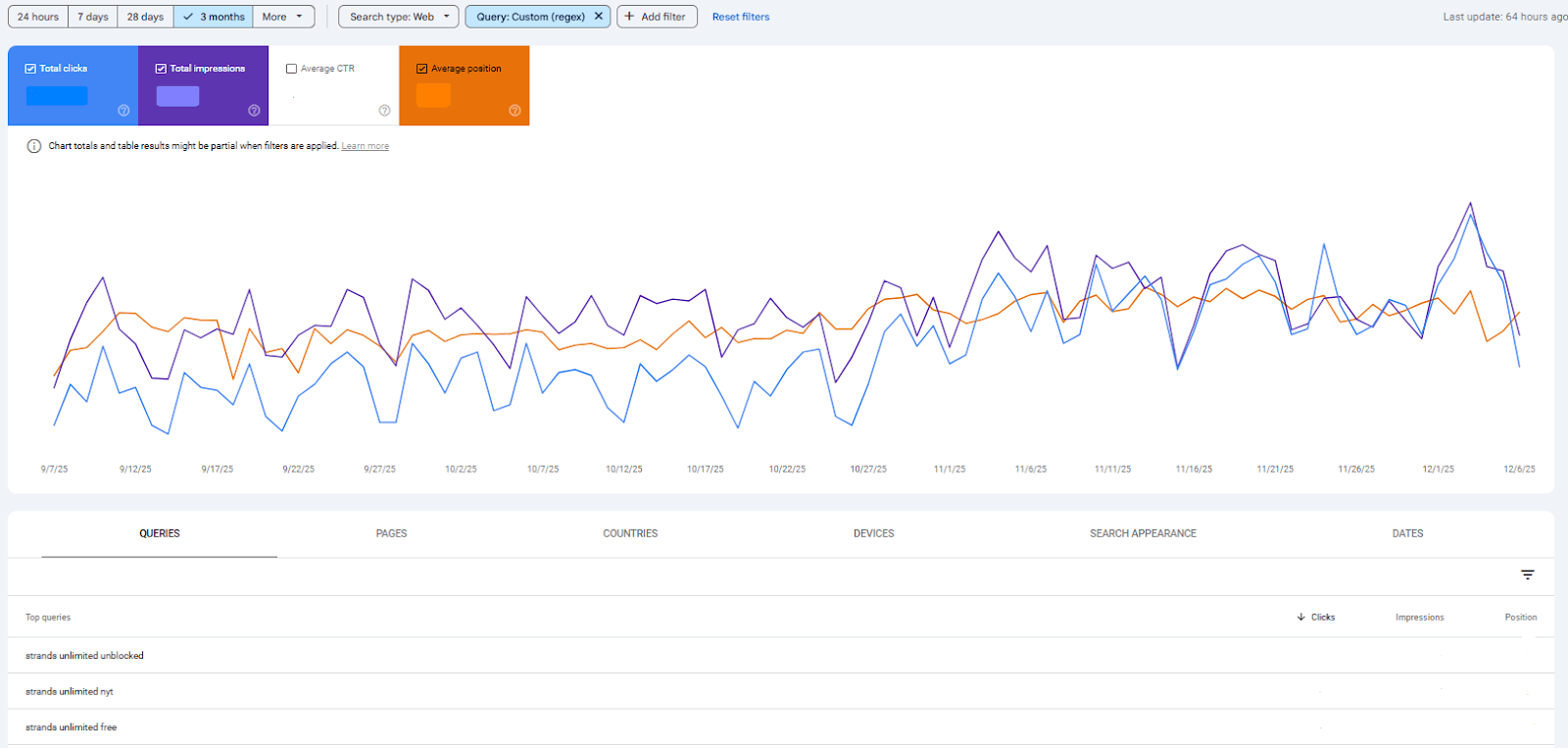
This regex revealed queries such as
- strands unlimited unblocked, strands unlimited nyt, strands unlimited free
- strands unlimited game, strands unlimited game unblocked, strands unlimited archive
- strands unlimited nyt free, strands unlimited, new york times
Using Google Search Console performance data, we observed that in the query play strand, we were at position 9 in the SERP, so we optimized our content for the play strands, in the title section and wherever possible.
After a month, we gradually ranked at position 2. That’s how we use regex to improve our keyword targeting and optimize our web content.
Regex to find queries for Blog
The blog needs to cover all information content. We write blogs to provide readers with detailed information about their queries.
To increase their knowledge. So we used this regex to exactly find the information our readers are searching for.
^(how|why|what|when|where|who)
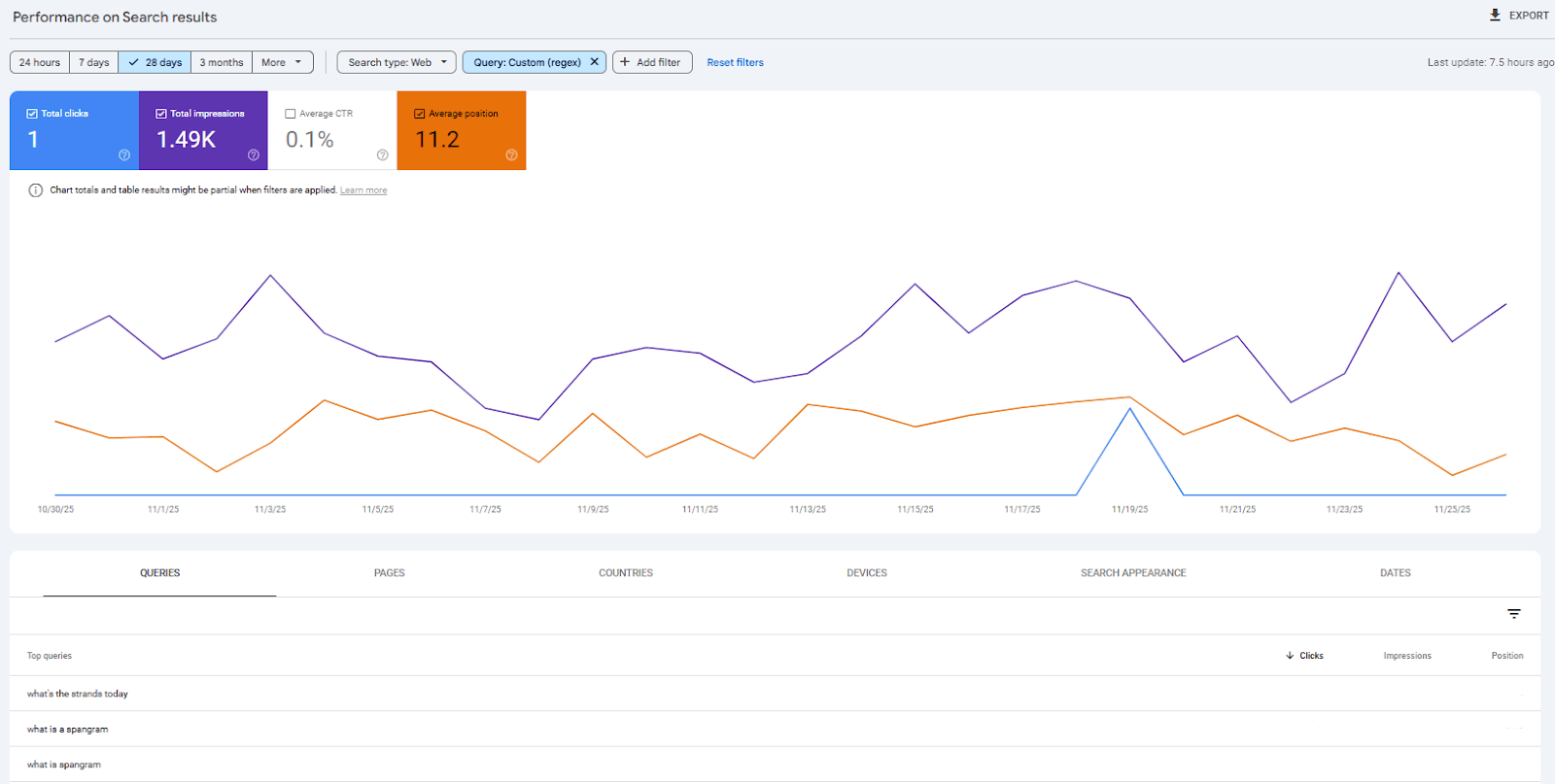
We got the following results
- What’s a spangram
- what is the spangram
- what was yesterday’s strands
- how to play Strands Nyt game
- what does spangram mean
So optimized our website blog section by writing blogs about spangram. Its use case and tips to solve spangram quickly. How Spangram helps in playing the strands game. Providing unique, relevant information to readers helped us rank highly on Google.
Regex to find Branded keyword
These are the patterns we applied to our website to filter out keywords that indicate how we ranked against the brand keyword.
^(Strands NYT).*
This regex shows all queries containing the brand NYT keyword. This regex gave us insight into where we ranked relative to our main competitor.
Regex for Negative Phrase Analysis
(don’t|not|terrible|worst|waste).*
This regex matches all queries that contain words for negative emotions or frustration. We got the S theme strands as the worst strands in the puzzle. People didn’t like that. So we talk about it in the blog section.
Conclusion
Regex has become an essential skill for SEO professionals seeking more accurate, in-depth keyword targeting. As search engines are getting smarter, user queries are becoming more complex.
Manual keyword research is no longer enough. Regex patterns are the best way to identify intentional queries, branded vs. non-branded keywords, and long-tail keywords.
With the advanced regex filter option in Google Search Console, marketers can now gain deeper insights into people. Regex empowers SEO workers to do work with precision rather than guesswork.
To learn regex patterns, start with an easy one and build up to complex data sorting. No matter whether you are writing a blog, setting up an e-commerce store, or doing local SEO, regex patterns give you an extra advantage to outrank your competitors with correct keyword targeting. Make smart data-based decisions.